
Start here
The site was rebuilt in November 2026. Everything you used before is still there, plus new ways to pick a game, see who's winning, and look back on game nights.
The 30-second tour
- The home page is the game shelf. Search, tap a player count, and tap a game's name for its own page.
- The row of buttons under the header (the Stats bar) leads to everything else. It scrolls sideways when it doesn't fit.
- What should we play? suggests games for tonight's crowd and has a spinner wheel.
- On any other page, the logo at the top left (with a small back arrow) takes you home.
What changed if you've used the old site
| Before | Now |
|---|---|
| A game's name went to BoardGameGeek | It opens the game's own page; the picture still goes to BGG |
| Sign out sat at the top | Tap your name at the top right for Change password and Sign out |
| Columns were cut off on phones | The games table scrolls sideways, with the name pinned on the left |
| Play history had a few date buttons | A button for every year with plays |
Getting around
The home page is the hub: every other page has the logo at the top left with a small back arrow, and tapping either takes you home.
- Stats bar. The row of rounded buttons under the header: What should we play?, Last game night, Wrapped, Rivalries, Play history, Records and more. On a phone, swipe it sideways; on a computer, scroll it with the mouse wheel. A faded edge means there are more buttons that way.
- Colours and dark mode. Tap the paint palette at the top right to pick a colour theme and light, dark or automatic. Your choice is remembered on that device.
- Signing in. Most pages work without signing in. Sign in to log plays (admins), flag games you want to play, or change your password. Tap Sign in at the top right.
- Your name menu. Once signed in, your name shows at the top right. Tap it for Change password and Sign out.
- Invite links. New members get a link instead of a password. Open it, tap the button, and choose your own password. Each link works once and expires; if it says it doesn't work anymore, ask for a new one.
Finding a game
The quickest way to find a game is the search box plus a player-count button; Filters covers everything else.
- Search. Type part of a game's name, a publisher, or who won it last.
- Player count. Tap 2 to 9+ to see games that play that many. In Filters you can switch between exact max, "or more" and "best with".
- Filters. Game type (big or filler), weight, owner, never played, and Here tonight?, which hides games that are at someone's house or lent out. The tags above the list show what's on; tap a tag's x to remove it.
- Sort. Group vote, BGG rank, name, last played and more; the arrow button flips the order.
- Table or Cards. Table packs more in. On a phone, swipe the table sideways for the other columns; the picture and name stay put.
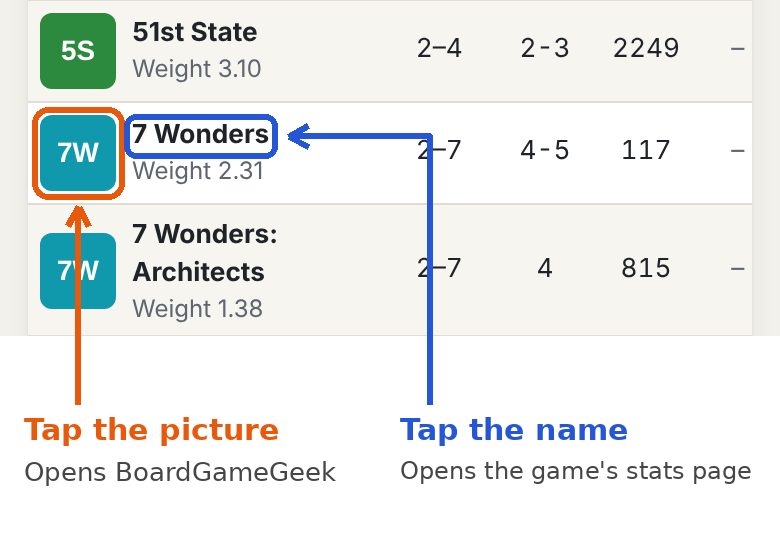
Name or picture? They go to different places.
Every game in the list has a picture and a name, and they do different things:
- Tap the name to open the game's own stats page on our site.
- Tap the picture to open the game on BoardGameGeek, in a new tab.
Tags you'll see next to games
| Tag | Meaning |
|---|---|
| At Dave's house (or similar) | The game lives elsewhere and isn't here tonight |
| Lent to Bob | Borrowed; it can't go on the pull list until it's back |
| A heart with a number | That many people want to play it soon |
| An owner's name | The game belongs to that person |
Game pages
Each game has its own page with everything we know about it. Open it by tapping a game's name anywhere on the site: the home page, Players, Records, Rivalries, a recap or the picker.
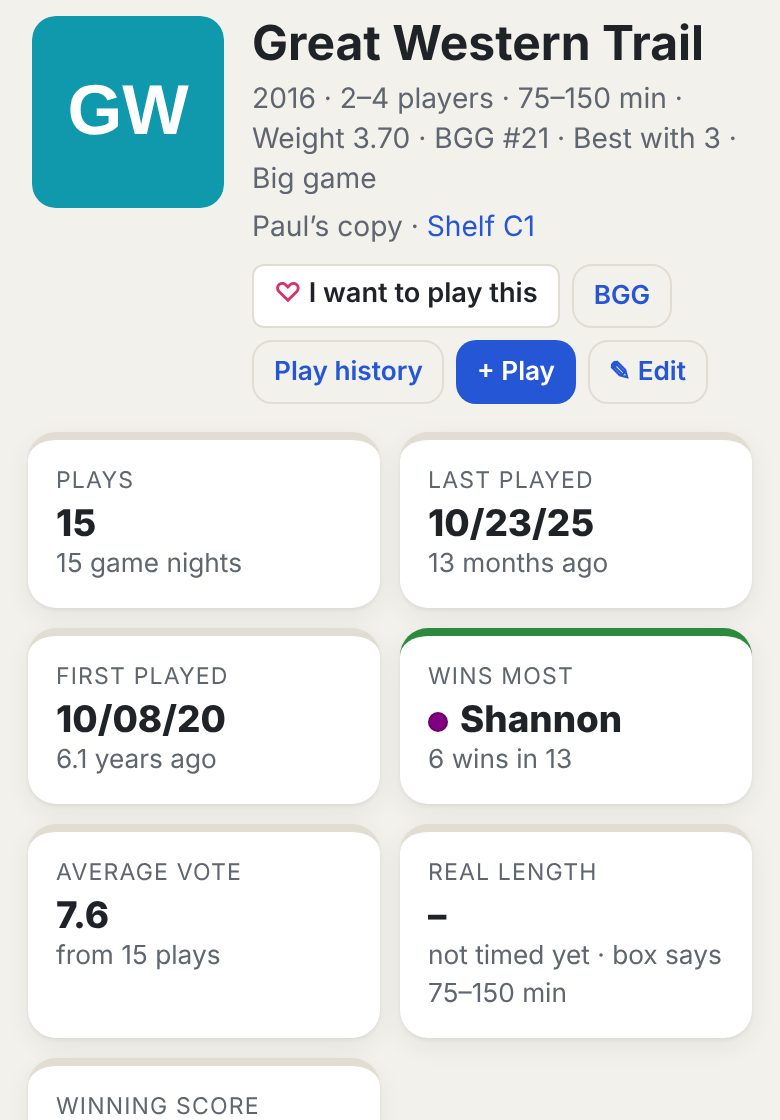
At the top
- Box details: year, player count, box time, weight, BGG rank, best player count, and big game or filler.
- Where it is: whose copy it is and its shelf spot. Tap the shelf spot to see it on the Shelves map. If it's at someone's house or lent out, that shows instead.
- Buttons: I want to play this, BGG, and Play history (every play of this game). Admins also get + Play and Edit.
The cards
| Card | What it tells you |
|---|---|
| Plays | How many times we've played it, and on how many game nights. Tap it for the play history |
| Last played / First played | The dates, and how long ago |
| Wins most | Who has won it the most times |
| Average vote | The group's average rating from the votes recorded with each play |
| Real length | How long it really takes us, from Tappo-timed plays and corrected play times. Shows "not timed yet" until there's data |
| Winning score | The average winning score (marked "low wins" for low-score games) |
Year buttons at the top narrow everything to one year. On All time, a Plays by year chart shows how often it gets played; tap a bar to jump to that year.
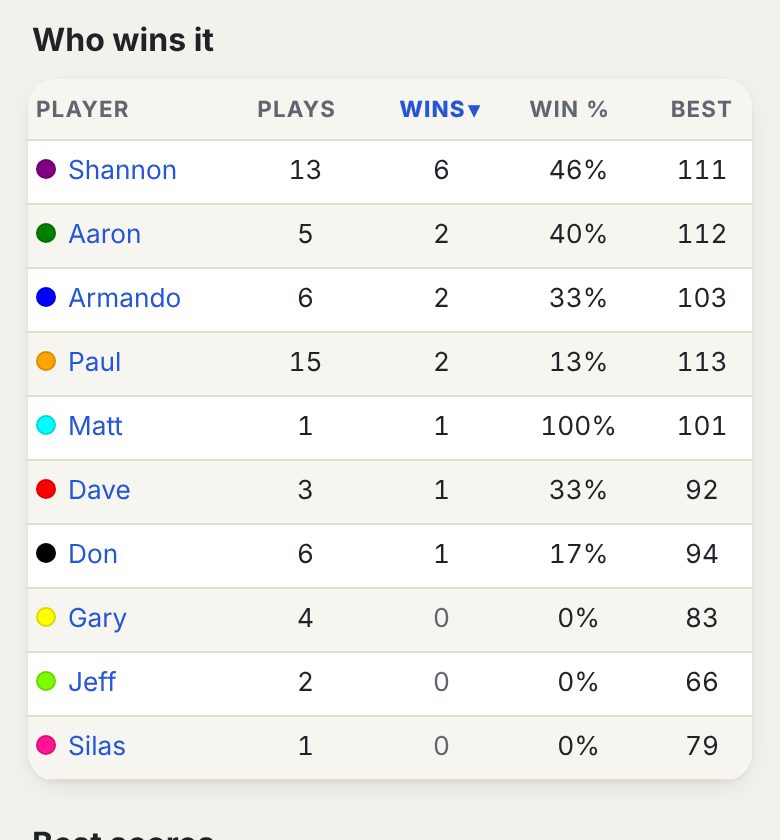
Lower down
- Who wins it: everyone who has played it, with plays, wins, win %, DFLs, average place and best score.
- Best scores: the top five scores ever, with who and when. For low-score-wins games it lists the lowest scores.
- Every play: the latest 12 plays with everyone's scores, the winner marked, votes and comments. Tap Show all for the rest.
What should we play?
Tell it who's here and how long you have, then spin the wheel or take one of its top picks. Open it from the first button in the Stats bar.
- Who's here? Tap everyone at the table (regulars from the last two years are listed). Use the minus and plus buttons for guests. It only suggests games that fit that many players.
- How long? Any, 45 min, 90 min or 2.5 hours. It uses how long a game really takes us when it knows, not just the box time.
- What kind? Any, big game or filler.
- Optional ticks: best at this count, not played this month, new to everyone here, never played, and someone here wants it.
- Spin! The wheel holds 12 games that fit, with better fits more likely to make it on. Tap Spin (or the dice in the middle). The speaker button turns the clicking off.
- The result card shows the game, its shelf spot and why it came up. Tap Veto to swap it off the wheel and spin again, or New wheel for a fresh 12.
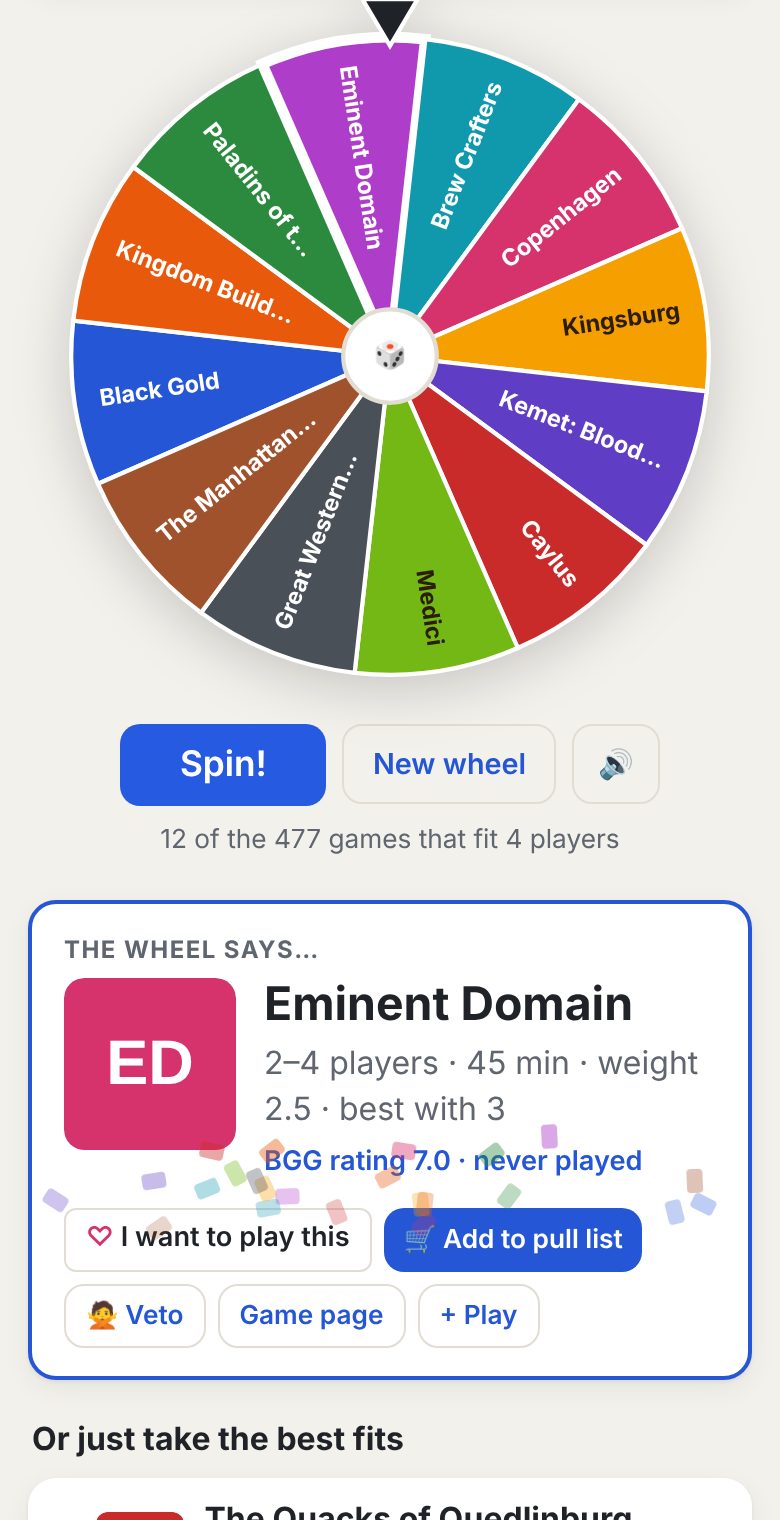
Only games that are actually here are included. Your choices are remembered for the rest of the day, and vetoes last for the night.
Or just take the best fits. Under the wheel is a top-6 list. Games rank higher when the group voted them up, they're best at tonight's count, nobody has played them in a while, they're new to people at the table, or someone here wants to play them.
I want to play this
Tap the heart next to any game you'd like to play soon; on nights you're there, the picker pushes it up the list.
- Where: next to game names on the home page, on each game page, and on the picker's result card.
- Tap again to take it back. A filled heart means it's on your list.
- The number beside a heart is how many people want that game. Hover or long-press it to see who.
- No heart showing? You need to be signed in, and your login has to be linked to your player name. Ask an admin to link it on the People page.
Stats and fun pages
Last game night, Wrapped, Rivalries and Records are all in the Stats bar. Each has year buttons, so you can look at all time or a single year.
Jump to: Last game night · Rivalries · Records · Wrapped · Other stats pages
Fair share comes up on several of these pages. At a 4-player table your fair share of the wins is 1 in 4. Add that up over every game you played and compare it with the wins you actually got: 1.00 means exactly your share, 1.40 means 40% more than your share. It's fairer than win % because winning at a 5-player table is harder than at a 2-player one.
Last game night
A recap of one game night: who came, what we played, who won, and anything special that happened. It opens on the latest night.
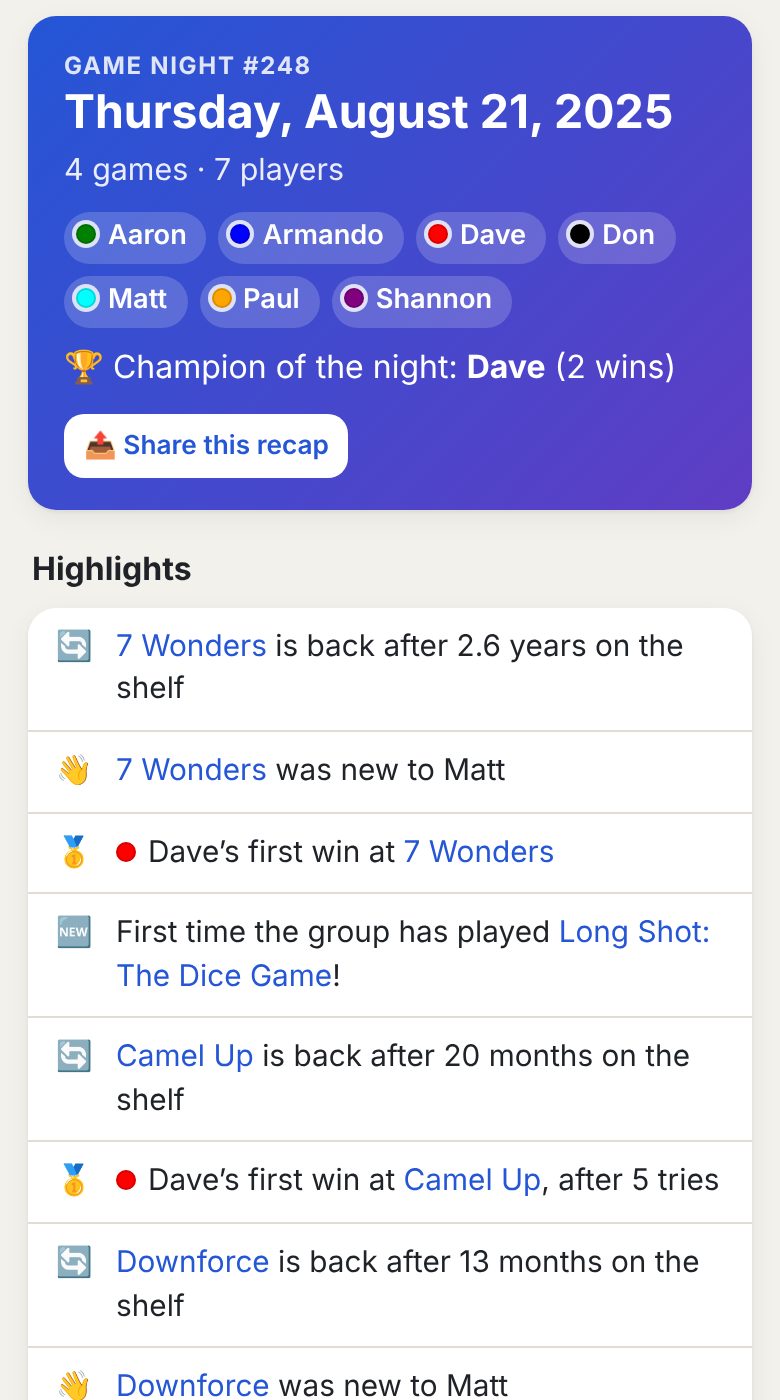
- The top: the game night number, the date, how many games and players, everyone who came, and the champion of the night (most wins).
- Highlights are worked out from all our history, for example:
- the first time the group has played a game
- a game back on the table after a long time
- someone's first win at a game, or a win on their first try
- a new high score for a game
- milestones like a 100th play, 50th win or 100th game night
- win streaks, and long streaks that ended
- What we played: each game in order, with everyone's scores, the winner, DFLs, votes, comments and, when the game was timed with Tappo, how long it took and the slowest and quickest player.
- Moving around: Earlier and Later step through nights, or pick any date from the list.
- Share this recap sends a short summary and the link, perfect for the group chat.
Rivalries
How you do against one particular person, counting only the plays you were both in.
Pick one player to see their record against everyone.
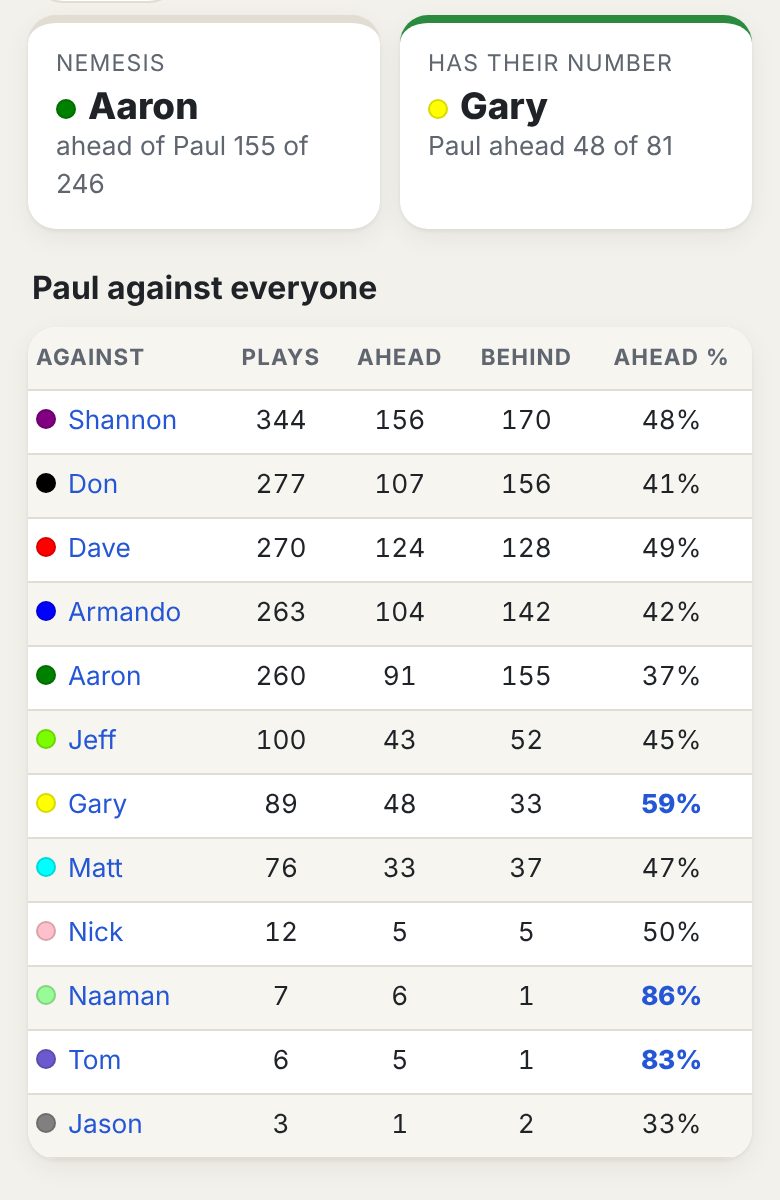
- Ahead / Behind: in each play together, one of you finished ahead of the other: you won and they didn't, or you had a better place or score. "Ahead %" leaves out plays too close to call.
- Nemesis: the person who most often finishes ahead of them. Has their number: the person they most often beat. Both need at least 10 decided plays together.
- Tap any name in the table for the full head-to-head.
Pick a second player for a head-to-head.
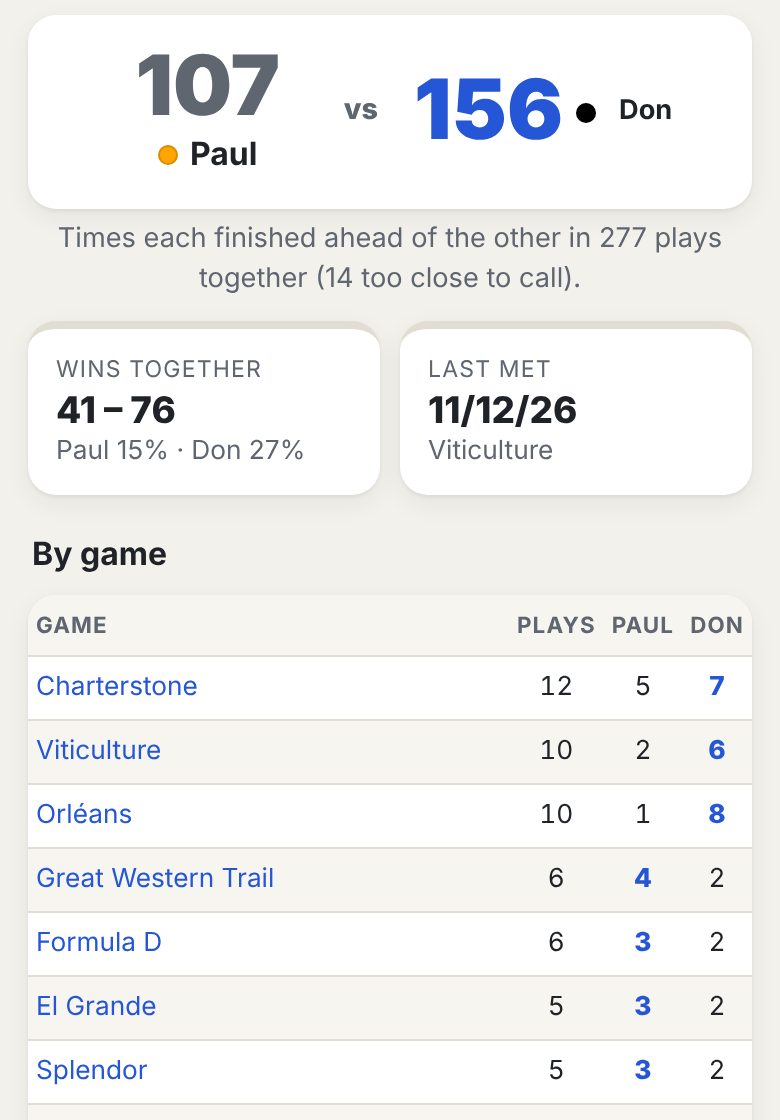
- The big numbers are how many times each finished ahead of the other.
- Wins together: how many of those shared plays each one won outright.
- On a run: shows when one person has finished ahead in the last few meetings in a row.
- By game: the record at each game they've played together. Recent meetings: their last 12 plays together.
Records
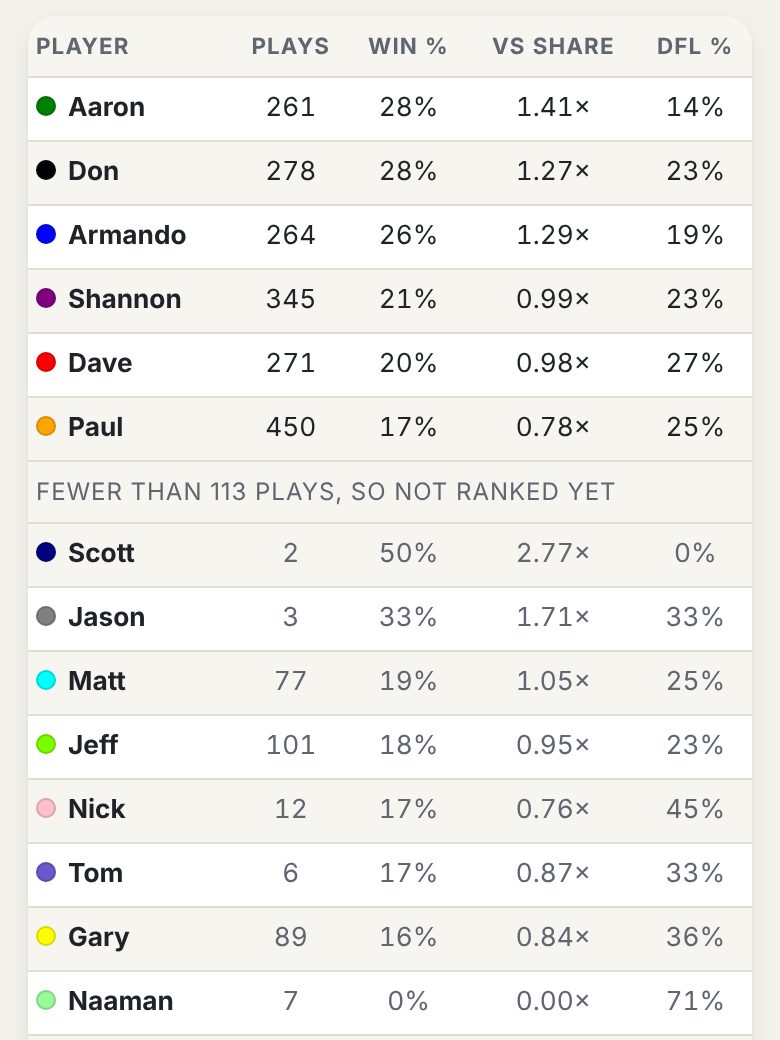
The group's records, built on rates rather than totals so that coming every week doesn't win by itself.
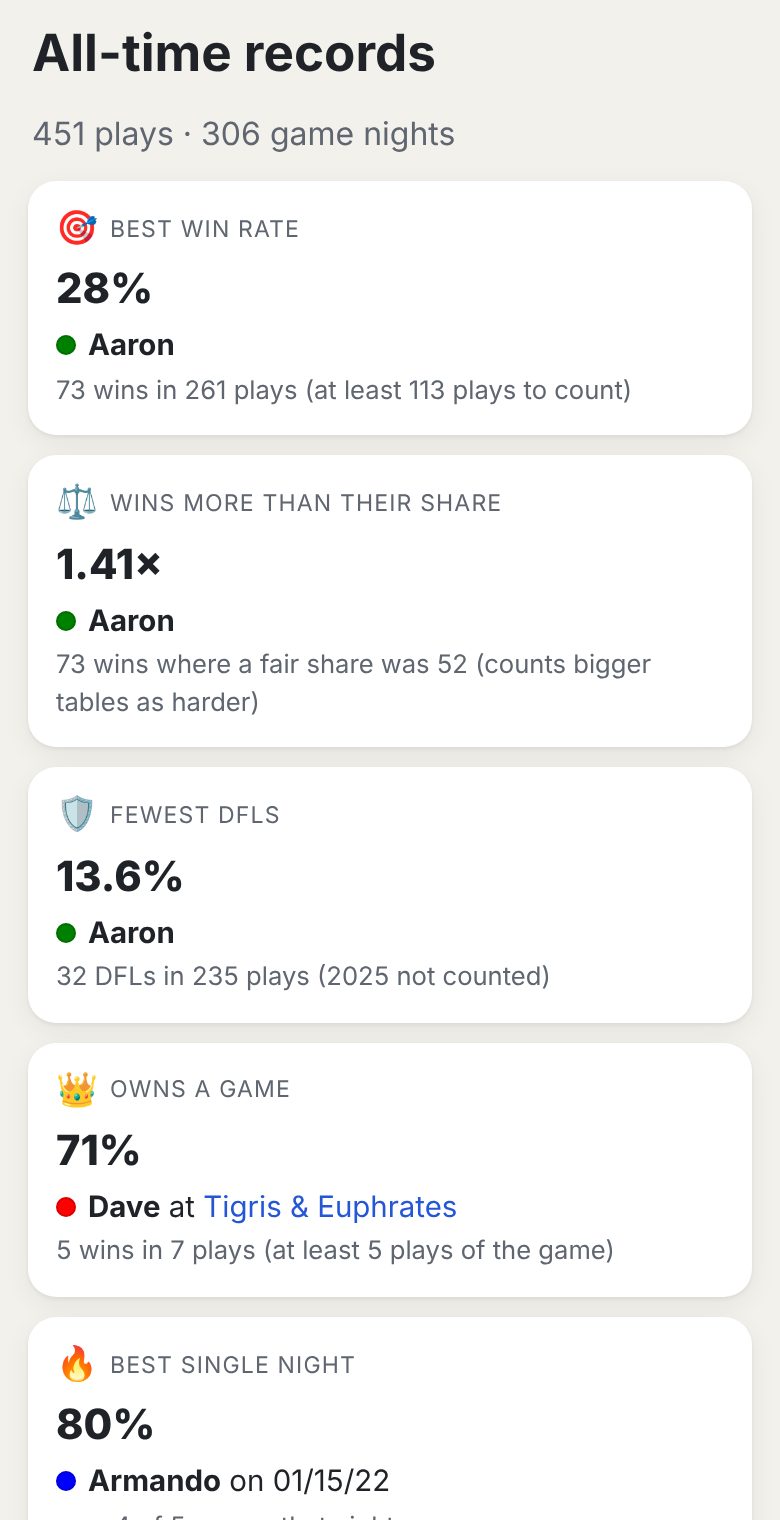
| Record | How it's decided |
|---|---|
| Best win rate | Wins divided by plays |
| Wins more than their share | Wins compared with a fair share at each table (see Fair share above) |
| Fewest DFLs | Lowest dead-last rate (2025 isn't counted; DFLs weren't recorded that year) |
| Owns a game | Best win rate at one game, with at least 5 plays of it |
| Best single night | Biggest share of one night's games won, with at least 3 games played that night |
| Longest winning streak / dry spell | Most wins in a row, and most plays in a row without a win |
| Most DFLs in a row | The longest dead-last run |
| Highest score / biggest win | The top score in any game, and the largest margin over second place |
| Won by a point (or less) | How many games were that close |
| Most games in one night / biggest game night | The busiest nights by games and by players |
| Longest game / most played game / longest comeback | Game records, including the longest gap before a game came back |
To be ranked in the rate records, you need at least a quarter as many plays as the most active player in that period (and never fewer than 5). Below the records, Standings by rate ranks everyone; people with too few plays are listed in grey under "not ranked yet".
Wrapped
Our year in review, like Spotify Wrapped. Pick a year, then The group or anyone's name. The current year shows as "so far" until December 31.
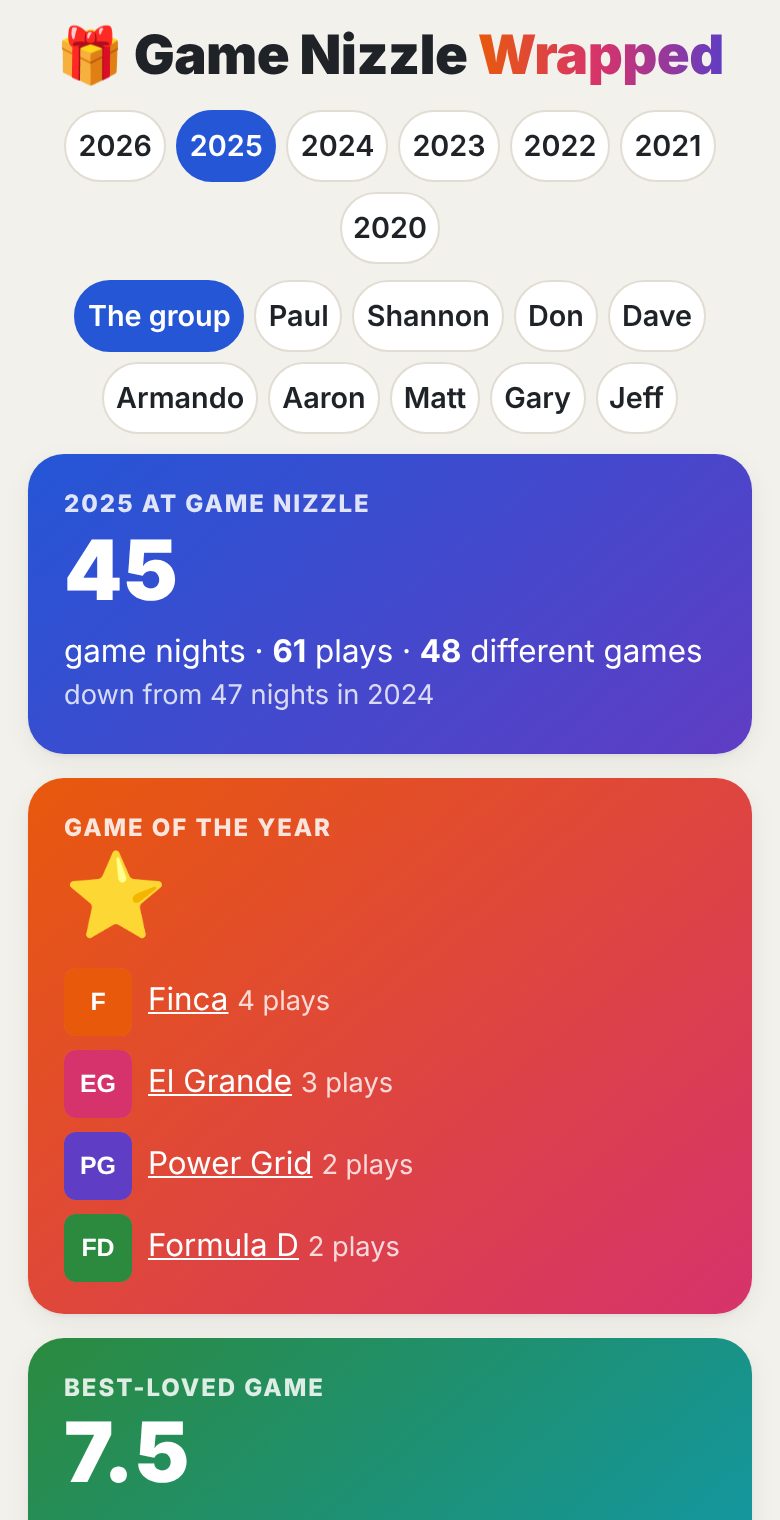
The group's year
- How many game nights, plays and different games, compared with the year before
- Game of the year: the most played games
- Best-loved game: the highest average vote (at least 2 plays)
- New to the table: games played for the first time ever that year
- The champion: best win rate among players with enough plays
- Most improved: the biggest jump in win rate from the year before
- Biggest night (with a link to its recap) and busiest month, with nights per month
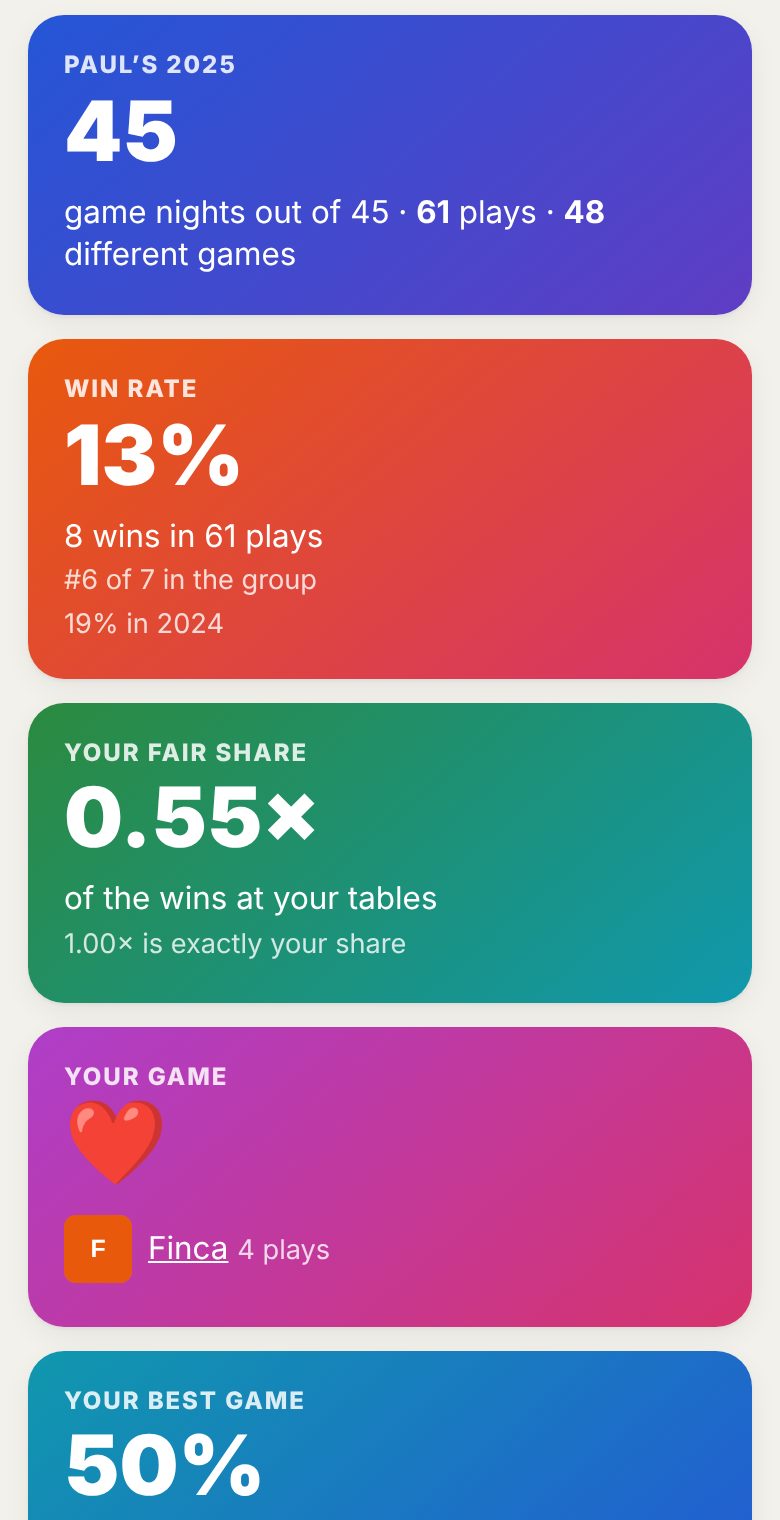
One person's year
- Game nights they came to, plays, and different games
- Win rate and their rank in the group, with last year's for comparison
- Your fair share of the wins (see Fair share above)
- Your game (most played) and your best game (best win rate, at least 2 plays)
- Your nemesis and you had their number: who beat them most, and who they beat most, by head-to-head record
- Best streak, new to you (games they played for the first time), and DFLs
Tap Share at the bottom to send the page to someone.
Other stats pages
| Page | What it shows |
|---|---|
| Play history | Every play, filtered by year (a button for each year), game or player |
| Players | Each person's stats and favourite games; game names open the game page |
| Win %, Places, Spills and more | The classic stats pages from the old site |
| Tappo | Turn-timer stats from the Tappo app: who takes longest, slow-turn awards, real game length |
Game night: who’s in?
Each week you
Paul sends one link in the group text each week. Tap itrsquo;ll get one link in the group text. Tap it, or tap 🙋 Who’s in? on the home page.
- Answer: pick your name the first time, then tap In, Maybe or Out. Add a note if you like (“running late”). Your phone remembers you, so next week it’s one tap. Change your answer any time.
- Food: tick 🍕 I’m in for food if you want pizza. It remembers what you said last time.
- See who’s coming: everyone’s answers and notes are on the same page, plus who hasn’t answered yet. The home page shows the totals too.
- 📅 Add to calendar puts the night in your phone’s calendar, with a reminder.
- Wrong name? Tap “Not you?” and pick yours.
- 📊 Attendance at the bottom shows how often each person said In, Maybe or Out, and who has the longest streak.
When the night moves
For holidays you’ll get a Which night works? link instead, sometimes weeks ahead. Tick every night you could make (tick none if none work), then Save my answer. The results show how many people can make each night. Once a night is picked, the “Who’s in?” page and the home page switch to that day for that week.
On the night
🃏 Game night on the home page is the page to keep open on the table: who’s coming, the games pulled for tonight (with the shelf to find them on), what’s been played so far and who won. 🎲 What should we play? there starts with everyone who said In already at the table.
Your colours
- Pick colours and light or dark with the 🎨 button at the top right.
- Signed in: your choice is saved with your login, so it follows you to any phone or computer. Not signed in: it’s saved in that browser only.
- Each player has their own colour, shown as a dot next to their name on the stats pages.
New Game Thursday
On the first Thursday of every month we play something we've never played before, and the site shows only those games that day.
- A red NEW GAME THURSDAY! banner appears at the top of the home page.
- The game list shows only games with no recorded plays. The "never played / played before" filter is hidden because it doesn't apply.
- What should we play? starts with "Never played" ticked.
- The next day, everything is back to normal on its own.
If you're wondering why most games have vanished from the list, check the date: it's probably the first Thursday.
Quick answers
| Problem | Fix |
|---|---|
| “Who’s in?” shows someone else’s name | Tap “Not …?” and pick your own name; your phone will remember you from then on |
| My colours changed when I signed in | Colours are saved per login. Pick what you want with 🎨 and it sticks for that login |
| Most games disappeared from the list | It's probably the first Thursday (New Game Thursday). Otherwise tap Clear all above the list to remove filters |
| A page looks broken or old | Pull down to refresh, or close and reopen the page |
| I can't see all the columns on my phone | Swipe the table sideways |
| I can't find the Rivalries (or another) button | Swipe the Stats bar sideways |
| "This link doesn't work anymore" | Invite links work once and expire. Ask for a new one |
| "This page was open too long" | Reload the page and try again |
| No heart next to games | Sign in; if it's still missing, ask an admin to link your login to your player |
| How do I sign out or change my password? | Tap your name at the top right |
| A game says "not timed yet" | It needs plays with a real time, or a Tappo game linked to the play |
| I'm not on Records | You need about a quarter as many plays as the most active player that period |